Independent creative technology studio · Selected work 2026

Selected work

Three working systems. See what each one does, how it is structured and where the evidence comes from.

W.01 · Tournament & team operations

Drone Soccer Fest

One operation, four roles.

A multi-role platform where admins, coaches, parents and students run one controlled tournament workflow.

Invitations, approvals, eligibility and payments cross four consoles while the system keeps a single consistent state.

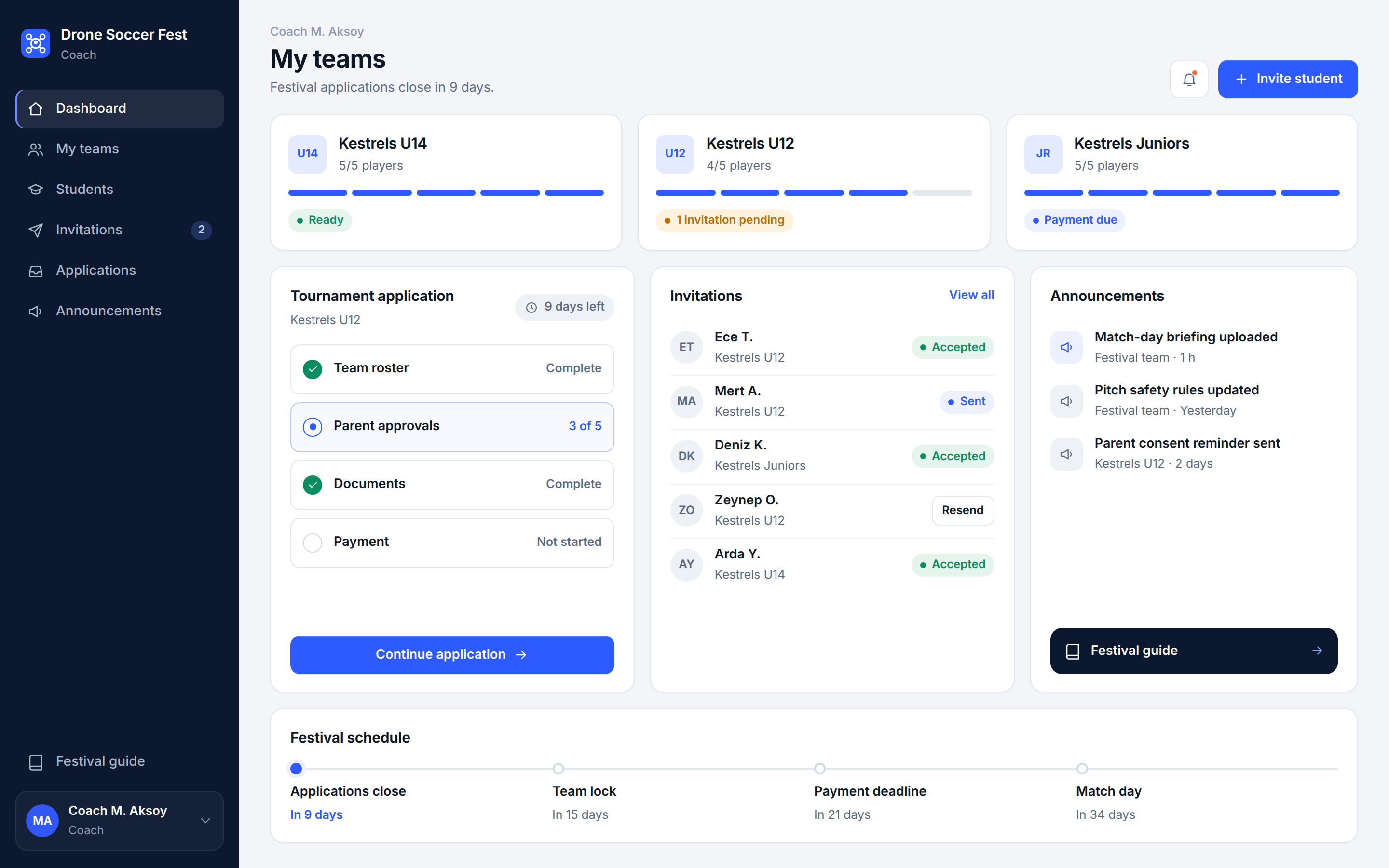
Drone Soccer Fest coach dashboard on desktop with teams, students, invitations and applications.
100%
E.01Coach dashboard · Desktop

The coach dashboard allows coaches to manage their teams, students, invitations and tournament applications from a single screen. It also provides quick access to announcements, notifications, team summaries and the festival guide.

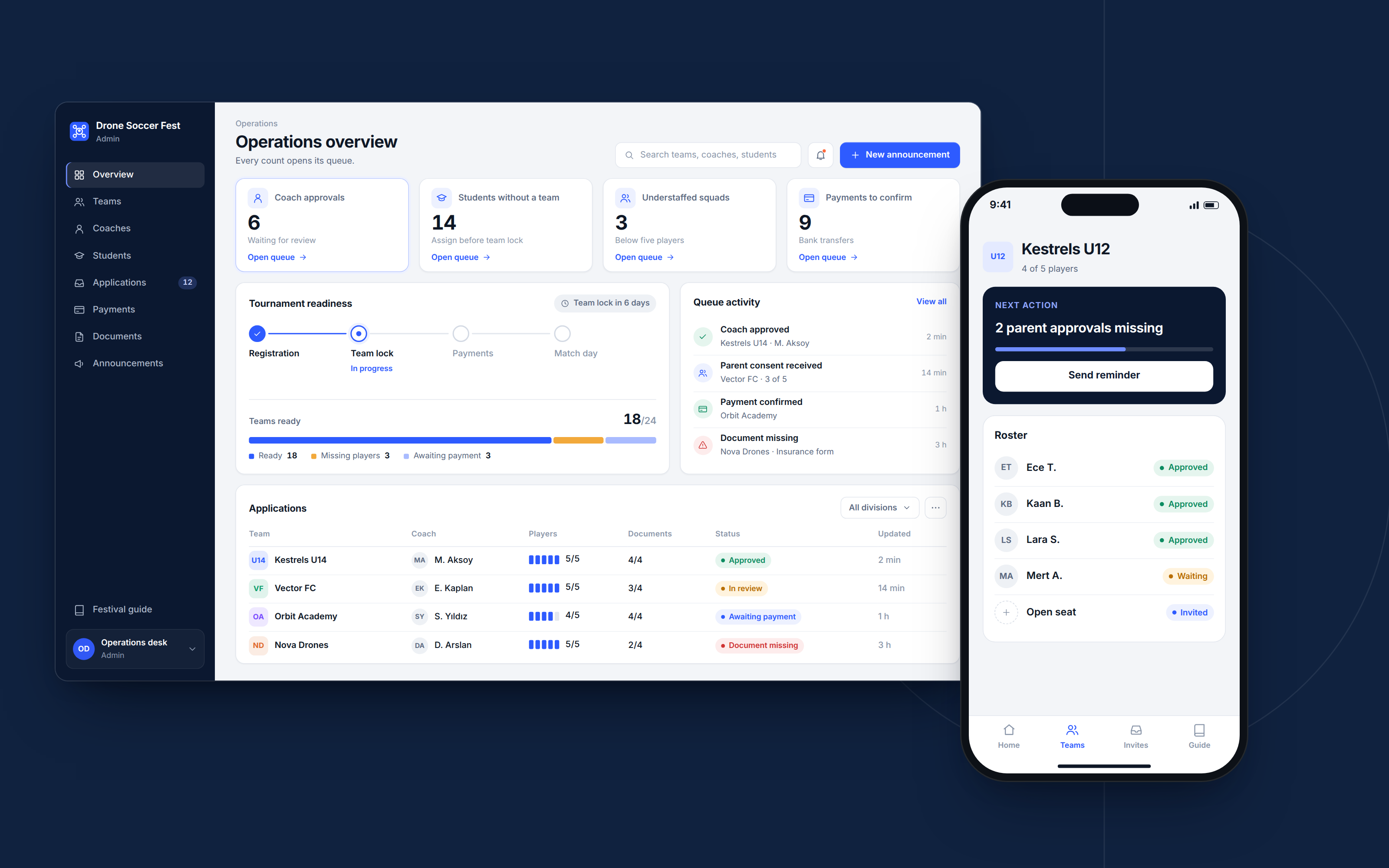
Drone Soccer Fest admin overview showing approvals, teams, payments and documents as operational queues. The screen is labelled as a prototype and contains no personal names.
100%
E.02Admin overview · Operations

The admin overview brings pending coach approvals, students without a team, under-staffed squads, payments and documents into one place. Every count opens its queue.
A single workflow keeps admins, coaches, parents and students coordinated. Invitations, approvals and payments stay out of scattered messages and spreadsheets.
W.02 · Game-performance diagnostics · Windows desktop

ZykeMark

Telemetry becomes a diagnosis.

A Windows desktop tool that records benchmark sessions and reads raw telemetry back as a clear performance diagnosis.

A WPF application with a CLI orchestrates capture; FPS behaviour, frame-time stability and stutter events feed a CPU-bound / GPU-bound call.

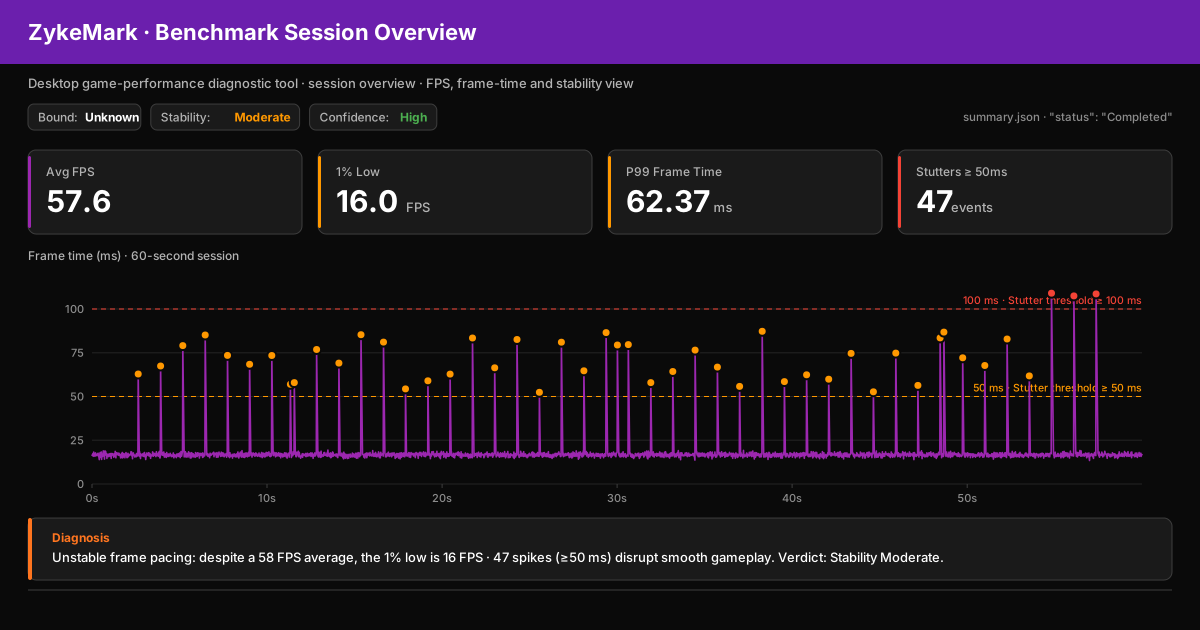
ZykeMark benchmark overview showing average FPS, 1% low, P99 frame time, stability and confidence.
100%
E.01Benchmark overview

The overview brings average FPS, 1% low, frame time and stability into one summary.

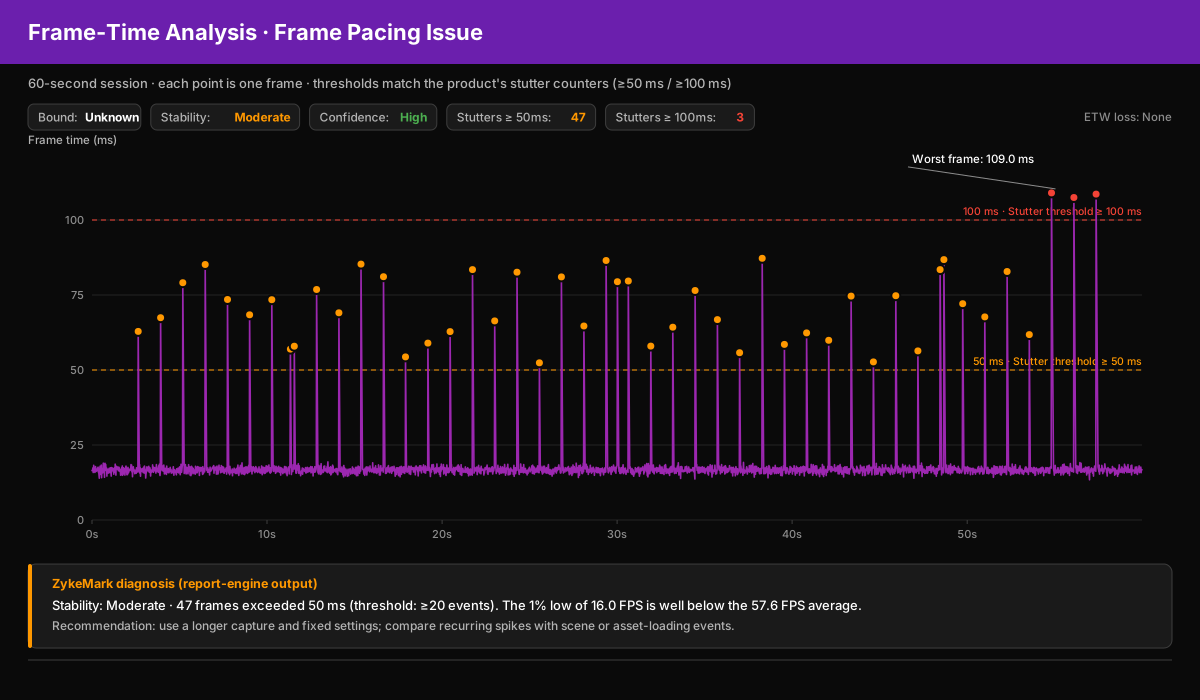
ZykeMark frame-time analysis showing 50 ms and 100 ms thresholds and counted stutter events.
100%
E.02Frame-time analysis

The chart separates pacing from headline FPS and counts stutter events against visible thresholds.

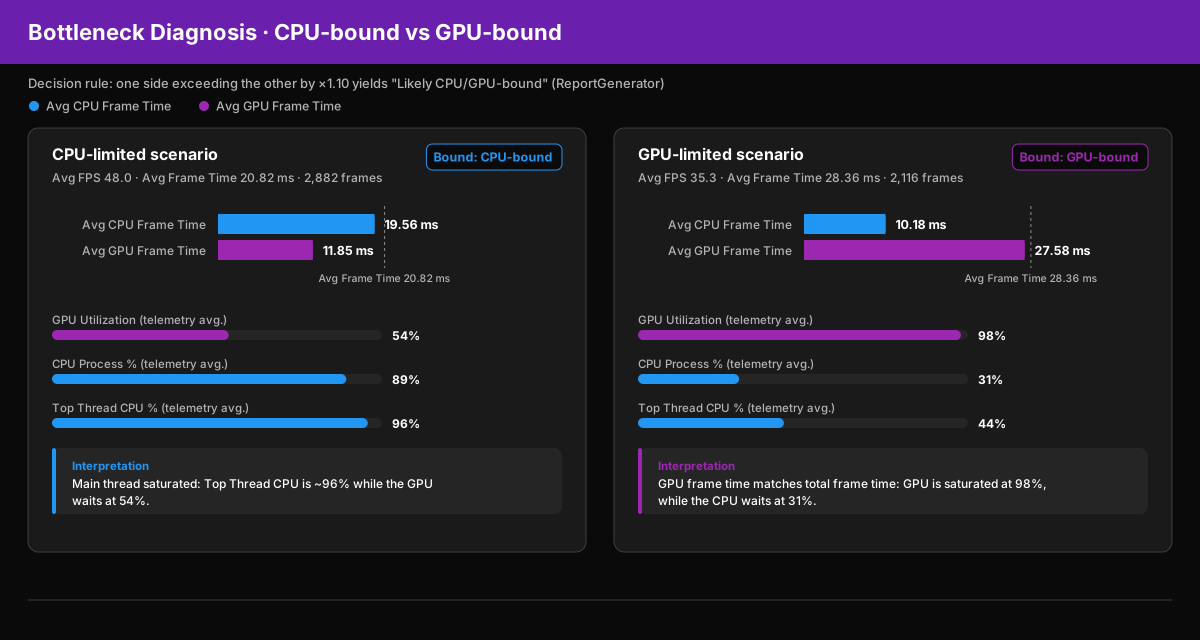
ZykeMark bottleneck diagnosis comparing CPU-bound and GPU-bound scenarios.
100%
E.03Bottleneck diagnosis

The paired scenarios show how the diagnostic layer distinguishes CPU-bound and GPU-bound behavior.

Measurement to diagnosis

A compact map of how benchmark capture moves from telemetry to diagnosis.

  1. Capture

    A WPF application and its CLI record a benchmark session on a Windows desktop.

  2. Telemetry

    The session keeps average FPS, 1% low, P99 and frame-time telemetry.

  3. Analysis

    Frame-time stability and stutter events past the 50 ms and 100 ms thresholds are surfaced.

  4. Diagnosis

    The session reads back as a CPU-bound or GPU-bound call.

The system turns raw telemetry into a clear CPU-bound or GPU-bound diagnosis. The result shows which side of the machine is holding frame performance.

W.03 · Visa-preparation workspace · Two roles

Vialo

Feedback becomes a next action.

An expert-guided workspace where applicants and experts prepare one visa file through a checklist, versioned documents, review and readiness.

The workspace connects document versions, review states and next actions in one traceable preparation file.

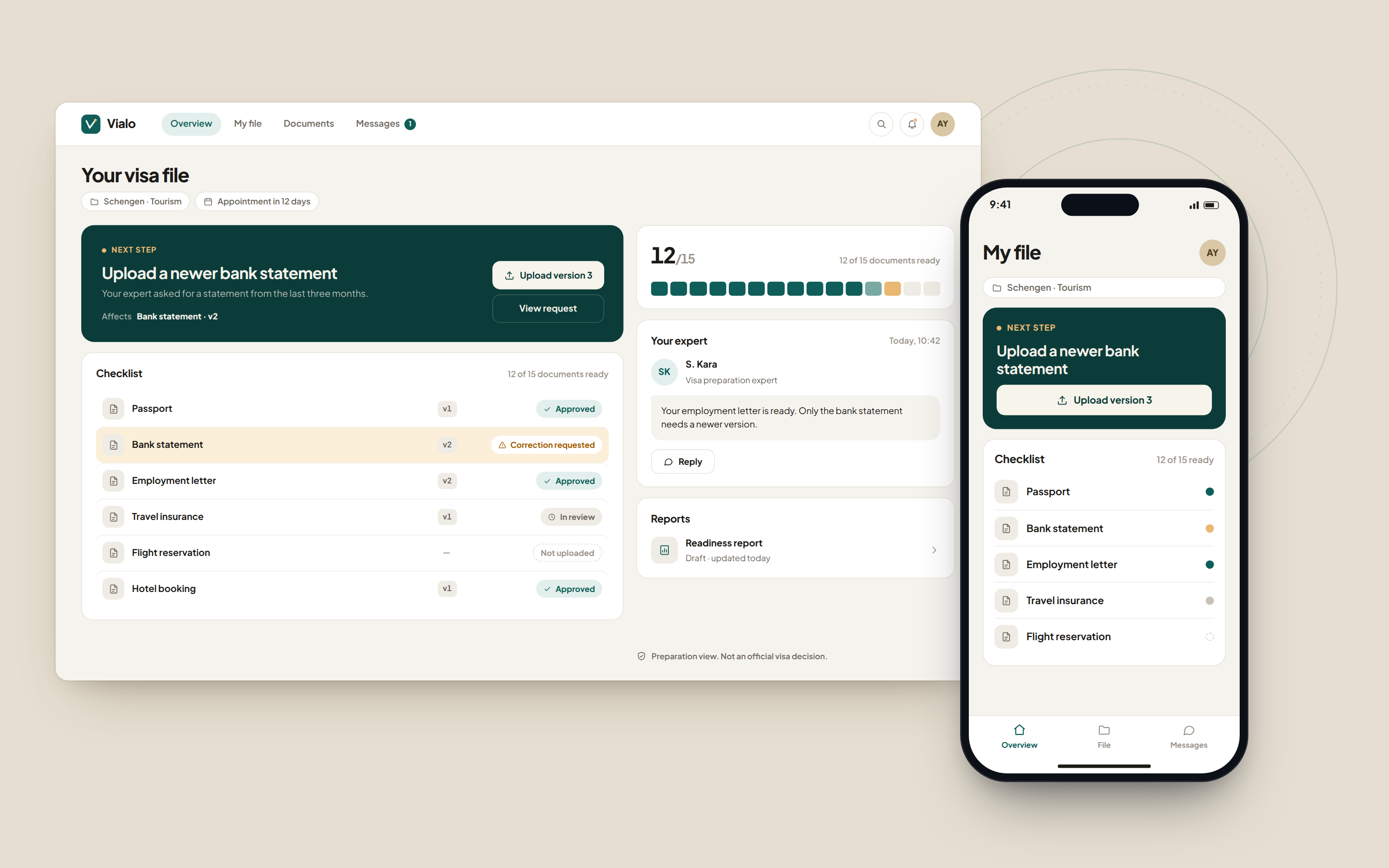
Vialo applicant dashboard showing the next step, active files, open corrections and reports.
100%
E.01Applicant dashboard · Applicant view

The dashboard leads with the next step. Active files, open corrections and published reports follow.

Correction to readiness

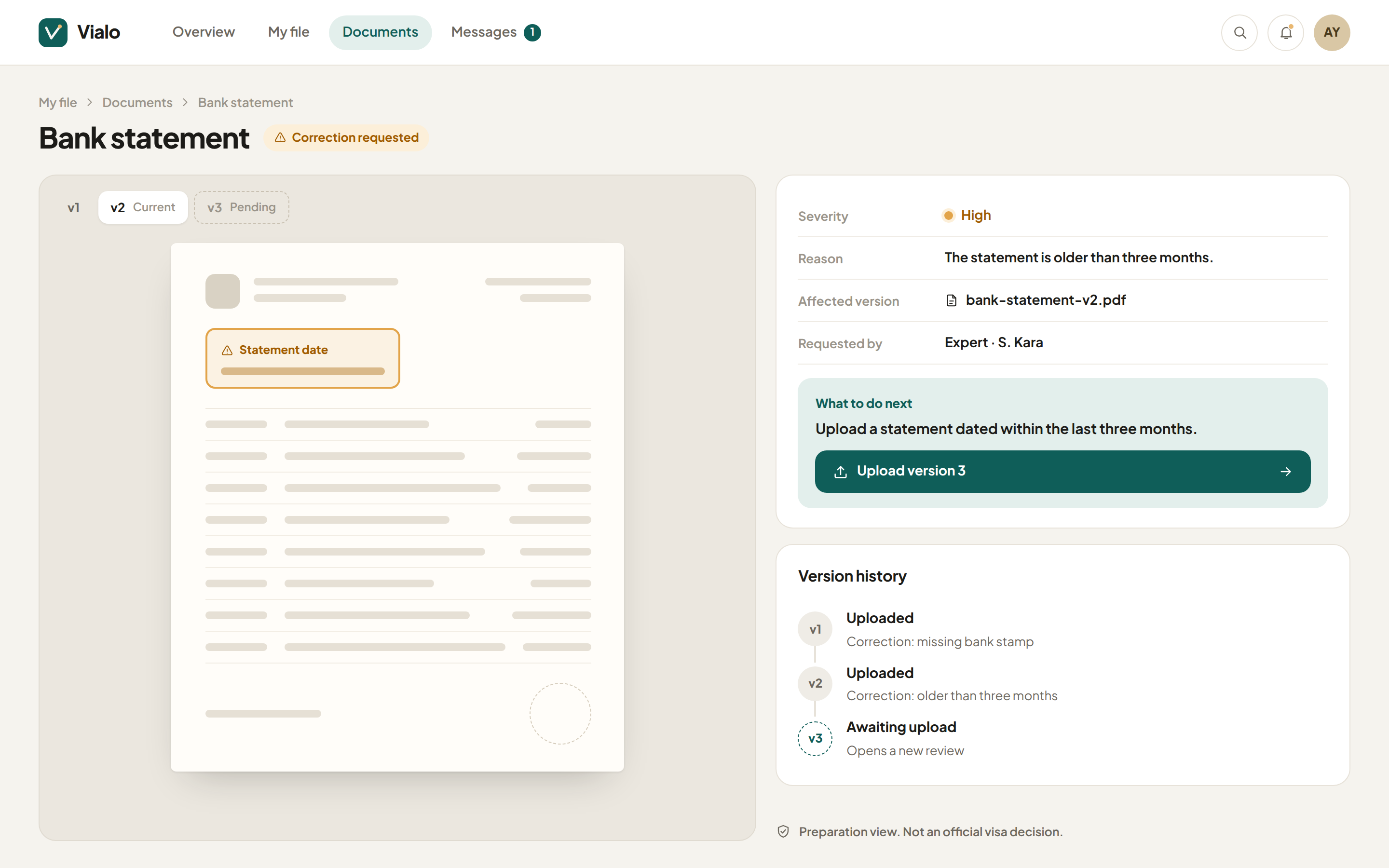
Expert feedback becomes a visible next action with a severity, a reason and the affected document version. The same file can then move toward a resolved, ready state.

Open correction

Vialo correction request showing severity, reason, the affected document version and one clear action. A note states that this is not an official visa decision.
100%
E.02Correction request · Applicant view

Resolved readiness

The same Vialo file in a resolved state with zero open corrections and a published readiness report. The screen is marked as a preparation view rather than an official authority.
100%
E.03Readiness state · Applicant view

An open correction becomes a clear next action, and the same file moves toward a ready state. This remains a preparation view rather than an official visa decision.

From your problem to a working system.

More case material is available on request.

Discuss a project